Are you ready to meet your new AI analyst?
It turns your business problem intoa decision
Give it your files and a short brief. Nexlyr AI reads, analyses and pressure-tests alongside you, and grounds every figure in your own data, never inventing one. The result is operational trust: a clear direction in a fully editable, branded deck, in minutes.
Computed from your data, not guessed. Every figure checked against your files.
Made for the business leaders who are expected to provide right direction.
Here is how it works. Watch it do the work.
- Give it your materialWord, PowerPoint, PDF or Excel. One file or many.
- It reads everythingKey passages found and marked, each tied to its file and page.
- It works the numbersFigures computed on your real data and checked against the source.
- It shapes the argumentRecognised frameworks give the case its structure.
- Slides form around the caseCharts, tables and layouts chosen for the point each slide makes.
- A deck you can trustA real, editable PowerPoint, every figure traced to your source.
It computes exact answers from your data
Nexlyr AI loads your tables into a real analysis engine and calculates each figure from your actual rows. Language models estimate. This computes.
- It loads your real rowsYour spreadsheets go into a proper analysis engine, every row, not a skim of the first page.
- It writes its own queriesThe analyst decides which comparisons matter, then writes and runs the calculations itself.
- It computes the exact figureTotals, variances and year-on-year moves are calculated from your rows, never estimated in the model's head.
- It lands on the slide, verifiedThe computed figure arrives on the slide already checked against your source.
It pressure-tests the business decision before your audience does
One click on Think Further after the deck is done, and Nexlyr AI turns sceptic and pressure-tests its own work the way the room will.
- It challenges the factsEvery figure and assumption is pressure-tested against the source, the way a sceptical analyst would.
- It asks what you did notThe questions the room will ask surface before the room asks them.
- It runs the what-ifsScenarios fork from your own figures, so you see how the case bends before you commit to it.
- It advises like a strategistGrounded recommendations lead the read. You decide what makes the deck.
It projects what comes next, then tells you where it missed
Ask Nexlyr AI to carry a measure forward and it projects from your own history, following the rhythm your figures move to. When the real months land, it reads that projection back against them.
- It projects from your own figuresChoose a measure and the projection is drawn from the months already behind it, straight onto the deck's own chart and clearly marked as projected.
- It follows your data's rhythmMonthly, quarterly or yearly, the projection moves the way your business moves, including the seasonal shape that repeats each year.
- It flags what it does not trustMonths missing from the history, a measure whose definition shifted, more than one currency in the same column. Nexlyr AI writes it on the slide, so nobody reads a provisional line as a firm one.
- It checks itself against what happenedAs the real figures land, Nexlyr AI compares them with what it projected and tells you which months landed inside its range and by how much each one missed.
An AI Analyst at your disposal, a thinking partner which works for you.
It learns your business
A workspace for each client or project banks what Nexlyr AI learns from your files, so every new deck starts from that context, not from zero. You can see what a workspace knows and clear it at any time.
It does the thinking
It reads everything you upload, chooses the analytical lens a consultant would, finds the argument, then structures the story before a single slide is drawn.
Figures traceable to your files
Every figure traces straight back to the business information you provided, and the speaker notes cite the file and page behind each slide. Nexlyr AI never invents facts or figures.
Your preferred, unique branding can be applied throughout your organisation
- Set your brand onceAdd your colours, font and logo as a saved kit.
- Every deck inherits itNew decks come out in your brand automatically. Colours, charts, title bars and logo, all applied.
- A kit per client or divisionConsultants keep one per client; companies keep one per division or acquired brand. As many as you need.
- Pin it and forget itPin a kit to a workspace and everyone's decks stay on-brand, with the option to switch a single deck.
A balanced set of charts, tables and layouts your argument needs
Charts computed from your data
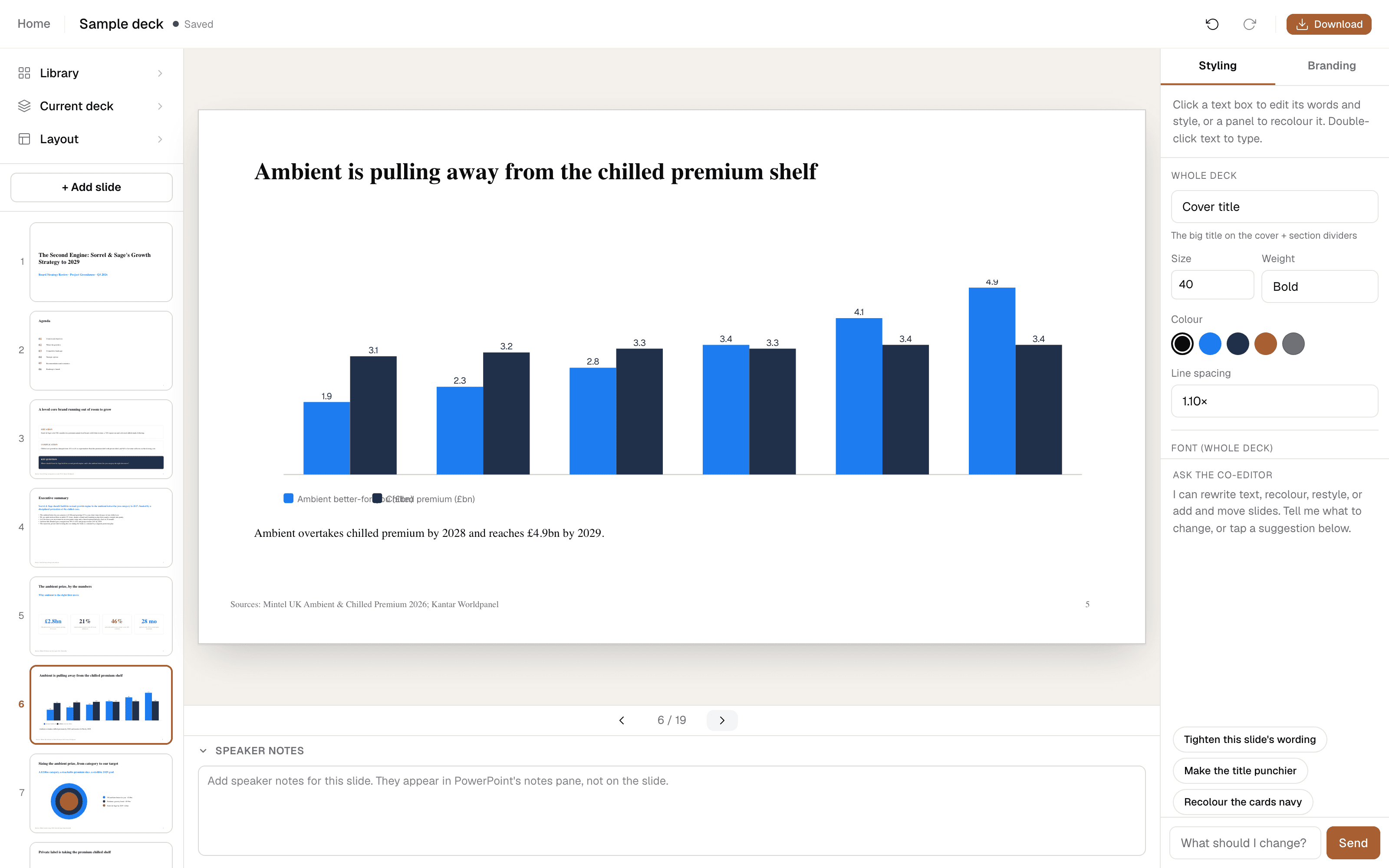
Native PowerPoint charts with real values behind them, coloured to your brand.
Consulting frameworks
Five Forces, value chains, 2x2s, driver trees.
Real tables
Built to be edited
Move, retype, recolour, restyle to your brand. It is your file.
Pyramids and more
Pricing
- From executive decks to detailed programme roadmaps
- Workspaces that continue to evolve with new information
- Upload up to 10 files (5 MB each)
- AI editing inside the editor
- Fully editable PowerPoint files, never an image
* Based on a text prompt and a small file. Larger files use more credits. 500 credits a month.
FreeAround 5 decks a month, up to 10 slides and 2 files (5 MB each) per deck. No card needed.
Start freeEnterpriseBespokeCustom volumes, team accounts and security reviews. Tell us what you need.
contact@nexlyrai.ukHow far Pro goes
Bigger reads use more, so a deep dive across large documents goes less far than a quick deck. You only use what a run actually needs, and a deck already running always finishes.
Questions, answered.
Is it really editable PowerPoint?+
Yes. Every slide is built from real PowerPoint shapes, text boxes, tables and charts. Open the file in PowerPoint or Keynote and edit anything. It is never an image of a slide.
Where do the numbers come from?+
Only from the material you upload. Nexlyr AI checks every figure against your source and will not invent a number to fill a chart. If a figure is not in your material, it does not appear.
What happens to my uploaded files?+
They are read to build your deck and are not stored afterwards. Only the deck you create is saved to your account.
Can it learn my business over time?+
Yes. Nexlyr AI remembers your business across decks, kept in a separate workspace for each client or project, so every new deck starts from that context instead of a blank page. You stay in control: see what a workspace has learned and clear it at any time.
What does Think further do?+
It pressure-tests your finished deck like a sceptical business leader: it flags the weak points, asks the questions you did not and runs what-if scenarios on your own figures. You choose what makes it into the deck.
Can it forecast from my numbers?+
It projects them forward. Choose a measure and Nexlyr AI carries it on from the months already behind it, following the rhythm your own figures move to and marking the projected part on the chart. As the real months land it reads that projection back against them and tells you where it missed.
Does it actually calculate, or just summarise?+
It calculates. Your tables are loaded into a real analysis engine and each figure is computed from your actual rows: totals, variances, year-on-year moves, concentrations. A language model on its own estimates; Nexlyr AI runs the numbers.
What formats can I download?+
A fully editable PowerPoint file on every plan. Pro also downloads a self-contained web page version of the deck and slide images, and can export a selection of slides rather than the whole deck.
Can I update a deck when new numbers arrive?+
Yes. Every deck is kept as a version history in your account. Bring the new figures, choose Update with new info, and a new version is built alongside the old one. Nothing is ever overwritten.
Can I cancel anytime?+
Yes. Pro is £50 a month and you can cancel from your account whenever you like. You keep access until the end of the period you have paid for.